Estrutura de Arquivos
/visitantes/
├── index.php
├── admin.php
├── export.php
├── style.css
└── visitantes.txt (será criado automaticamente)
1. CSS para Lista de Compras (style.css)
/* style.css - Estilos gerais do sistema */

* {
margin: 0;
padding: 0;
box-sizing: border-box;
}

body {
font-family: Arial, sans-serif;
background-color: #f4f4f4;
padding: 20px;
}

.container {
max-width: 800px;
margin: 0 auto;
background: white;
padding: 30px;
border-radius: 10px;
box-shadow: 0 0 10px rgba(0,0,0,0.1);
}

h1 {
color: #333;
margin-bottom: 20px;
text-align: center;
}

.form-group {
margin-bottom: 15px;
}

.form-group label {
display: block;
margin-bottom: 5px;
font-weight: bold;
color: #555;
}

.form-group input {
width: 100%;
padding: 10px;
border: 1px solid #ddd;
border-radius: 5px;
font-size: 16px;
}

button {
background: #007bff;
color: white;
padding: 12px 20px;
border: none;
border-radius: 5px;
cursor: pointer;
font-size: 16px;
}

button:hover {
background: #0056b3;
}

table {
width: 100%;
border-collapse: collapse;
margin-top: 20px;
}

table th, table td {
padding: 10px;
border: 1px solid #ddd;
text-align: left;
}

table th {
background: #007bff;
color: white;
}

.btn-export {
background: #28a745;
margin-top: 15px;
}

.btn-export:hover {
background: #218838;
}

.mensagem {
padding: 10px;
margin: 10px 0;
border-radius: 5px;
}

.mensagem.sucesso {
background: #d4edda;
color: #155724;
border: 1px solid #c3e6cb;
}
2. Criar o arquivo index.php (Página do Visitante)
<?php
// index.php - Página onde o visitante se cadastra

// Inclui o arquivo de funções (opcional, mas organiza o código)
// Define o título da página
$titulo = "Cadastro de Visitantes";
?>
<!DOCTYPE html>
<html lang="pt-BR">
<head>
    <meta charset="UTF-8">
    <meta name="viewport" content="width=device-width, initial-scale=1.0">
    <title><?php echo $titulo; ?></title>
    <link rel="stylesheet" href="style.css">
</head>
<body>
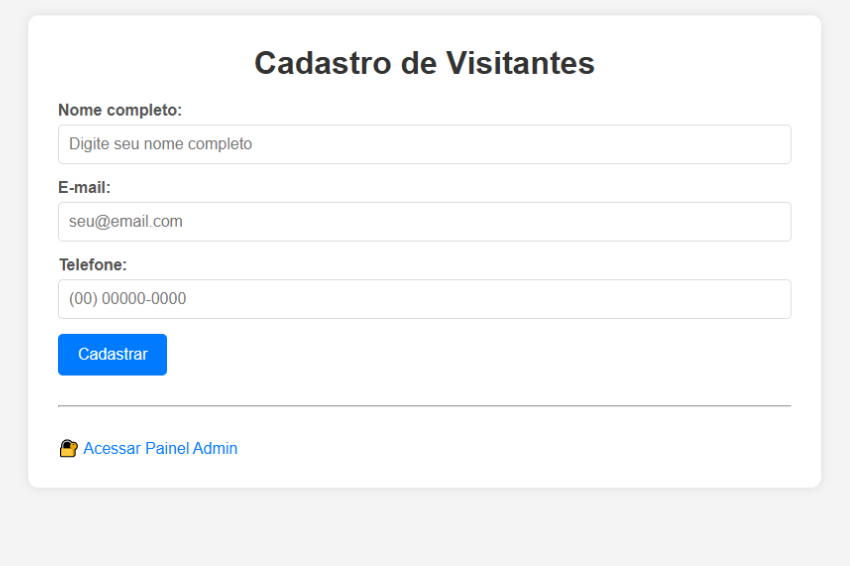
    <div class="container">
        <h1><?php echo $titulo; ?></h1>

        <?php
        // Verifica se o formulário foi enviado
        if ($_SERVER['REQUEST_METHOD'] === 'POST') {
            // Recebe os dados do formulário
            $nome = $_POST['nome'] ?? '';
            $email = $_POST['email'] ?? '';
            $telefone = $_POST['telefone'] ?? '';

            // Validação básica
            if (empty($nome) || empty($email) || empty($telefone)) {
                echo '<div class="mensagem" style="background:#f8d7da;color:#721c24;border:1px solid #f5c6cb;">';
                echo '⚠️ Todos os campos são obrigatórios!';
                echo '</div>';
            } else {
                // Formata os dados para salvar
                $dados = $nome . ';' . $email . ';' . $telefone . ';' . date('d/m/Y H:i:s') . "\n";

                // Salva no arquivo
                file_put_contents('visitantes.txt', $dados, FILE_APPEND);

                // Mensagem de sucesso
                echo '<div class="mensagem sucesso">';
                echo '✅ Cadastro realizado com sucesso!';
                echo '</div>';
            }
        }
        ?>

        <!-- Formulário de cadastro -->
        <form method="POST" action="">
            <div class="form-group">
                <label for="nome">Nome completo:</label>
                <input type="text" id="nome" name="nome" required placeholder="Digite seu nome completo">
            </div>

            <div class="form-group">
                <label for="email">E-mail:</label>
                <input type="email" id="email" name="email" required placeholder="seu@email.com">
            </div>

            <div class="form-group">
                <label for="telefone">Telefone:</label>
                <input type="tel" id="telefone" name="telefone" required placeholder="(00) 00000-0000">
            </div>

            <button type="submit">Cadastrar</button>
        </form>

        <hr style="margin: 30px 0;">

        <p>
            <a href="admin.php" style="color: #007bff; text-decoration: none;">
                🔐 Acessar Painel Admin
            </a>
        </p>
    </div>
</body>
</html>
3. Criar o arquivo admin.php (Painel do Administrador)
<?php
// admin.php - Painel administrativo para visualizar visitantes

// Define senha do administrador (em um sistema real, use banco de dados)
$senha_admin = 'admin123';

// Verifica se o usuário está logado
$logado = isset($_SESSION['admin_logado']) ? $_SESSION['admin_logado'] : false;

// Inicia sessão para controle de login
session_start();

// Se o formulário de login foi enviado
if ($_SERVER['REQUEST_METHOD'] === 'POST' && isset($_POST['senha'])) {
    if ($_POST['senha'] === $senha_admin) {
        $_SESSION['admin_logado'] = true;
        $logado = true;
    } else {
        $erro = 'Senha incorreta!';
    }
}

// Se o usuário clicou em sair
if (isset($_GET['sair'])) {
    session_destroy();
    header('Location: admin.php');
    exit;
}

// Se não está logado, mostra formulário de login
if (!$logado) {
    ?>
    <!DOCTYPE html>
    <html lang="pt-BR">
    <head>
        <meta charset="UTF-8">
        <title>Login Admin</title>
        <link rel="stylesheet" href="style.css">
    </head>
    <body>
        <div class="container">
            <h1>🔐 Login Administrativo</h1>

            <?php if (isset($erro)): ?>
                <div class="mensagem" style="background:#f8d7da;color:#721c24;">
                    <?php echo $erro; ?>
                </div>
            <?php endif; ?>

            <form method="POST" action="">
                <div class="form-group">
                    <label for="senha">Senha:</label>
                    <input type="password" id="senha" name="senha" required>
                </div>
                <button type="submit">Entrar</button>
            </form>
        </div>
    </body>
    </html>
    <?php
    exit;
}

// Se está logado, mostra o painel
?>
<!DOCTYPE html>
<html lang="pt-BR">
<head>
    <meta charset="UTF-8">
    <title>Painel Admin - Visitantes</title>
    <link rel="stylesheet" href="style.css">
</head>
<body>
    <div class="container">
        <h1>📋 Lista de Visitantes</h1>

        <div style="display: flex; justify-content: space-between; align-items: center; margin-bottom: 20px;">
            <a href="?sair=1" style="color: #dc3545; text-decoration: none;">🚪 Sair</a>
            <a href="export.php" class="btn-export" style="text-decoration: none; display: inline-block; padding: 10px 20px;">
                📥 Exportar CSV
            </a>
        </div>

        <?php
        // Lê o arquivo de visitantes
        $arquivo = 'visitantes.txt';

        if (file_exists($arquivo) && filesize($arquivo) > 0) {
            // Lê todas as linhas do arquivo
            $linhas = file($arquivo, FILE_IGNORE_NEW_LINES);

            if (count($linhas) > 0) {
                echo '<table>';
                echo '<thead>';
                echo '<tr>';
                echo '<th>#</th>';
                echo '<th>Nome</th>';
                echo '<th>E-mail</th>';
                echo '<th>Telefone</th>';
                echo '<th>Data/Hora</th>';
                echo '</tr>';
                echo '</thead>';
                echo '<tbody>';

                // Inverte a ordem para mostrar os mais recentes primeiro
                $linhas = array_reverse($linhas);
                $contador = 1;

                foreach ($linhas as $linha) {
                    // Divide a linha usando o separador ;
                    $dados = explode(';', $linha);

                    // Verifica se tem todos os dados
                    if (count($dados) == 4) {
                        echo '<tr>';
                        echo '<td>' . $contador++ . '</td>';
                        echo '<td>' . htmlspecialchars($dados[0]) . '</td>';
                        echo '<td>' . htmlspecialchars($dados[1]) . '</td>';
                        echo '<td>' . htmlspecialchars($dados[2]) . '</td>';
                        echo '<td>' . htmlspecialchars($dados[3]) . '</td>';
                        echo '</tr>';
                    }
                }

                echo '</tbody>';
                echo '</table>';

                echo '<p style="margin-top: 15px; color: #666;">';
                echo 'Total de visitantes: ' . count($linhas);
                echo '</p>';
            } else {
                echo '<p>Nenhum visitante cadastrado ainda.</p>';
            }
        } else {
            echo '<p>Nenhum visitante cadastrado ainda.</p>';
        }
        ?>
    </div>
</body>
</html>
4. Criar o arquivo export.php (Exportação CSV)
<?php
// export.php - Exporta os dados em formato CSV

// Verifica se o usuário está logado
session_start();
if (!isset($_SESSION['admin_logado']) || $_SESSION['admin_logado'] !== true) {
    header('Location: admin.php');
    exit;
}

// Nome do arquivo CSV
$nome_arquivo = 'visitantes_' . date('Y-m-d_H-i-s') . '.csv';

// Headers para download
header('Content-Type: text/csv; charset=utf-8');
header('Content-Disposition: attachment; filename="' . $nome_arquivo . '"');

// Abre a saída
$saida = fopen('php://output', 'w');

// Adiciona BOM para UTF-8 no Excel
fprintf($saida, chr(0xEF).chr(0xBB).chr(0xBF));

// Cabeçalhos do CSV
fputcsv($saida, ['Nome', 'E-mail', 'Telefone', 'Data/Hora']);

// Lê o arquivo de visitantes
$arquivo = 'visitantes.txt';
if (file_exists($arquivo) && filesize($arquivo) > 0) {
    $linhas = file($arquivo, FILE_IGNORE_NEW_LINES);

    foreach ($linhas as $linha) {
        $dados = explode(';', $linha);
        if (count($dados) == 4) {
            fputcsv($saida, $dados);
        }
    }
}

fclose($saida);
exit;
?>